


Mektebi does not have an AI of its own. Its AI features work with an AI tool that you choose and use under your own account, for example Claude or ChatGPT. This chapter explains the three ways to use one, and what the AI tool can and cannot see in each. The promises themselves are in the privacy policy and the data processing agreement.
There are two kinds of connection, and they are kept apart:
- Help: the public help guides and this book. Anyone can use them, without signing in, and they contain no data of any mosque.
- The Course Assistant: for muallims and admins who are signed in. It works on draft courses of their mosque, and on nothing else.
Copy a guide for ChatGPT or Claude
Every help guide has a Copy for ChatGPT / Claude button. It copies the guide's text with a short note. You paste it into your AI tool together with your question, and the AI tool answers from the guide.
Nothing is sent anywhere by Mektebi: you decide what you paste. Never paste children's names or other personal data into an AI tool.
Connect your AI tool to the help guides
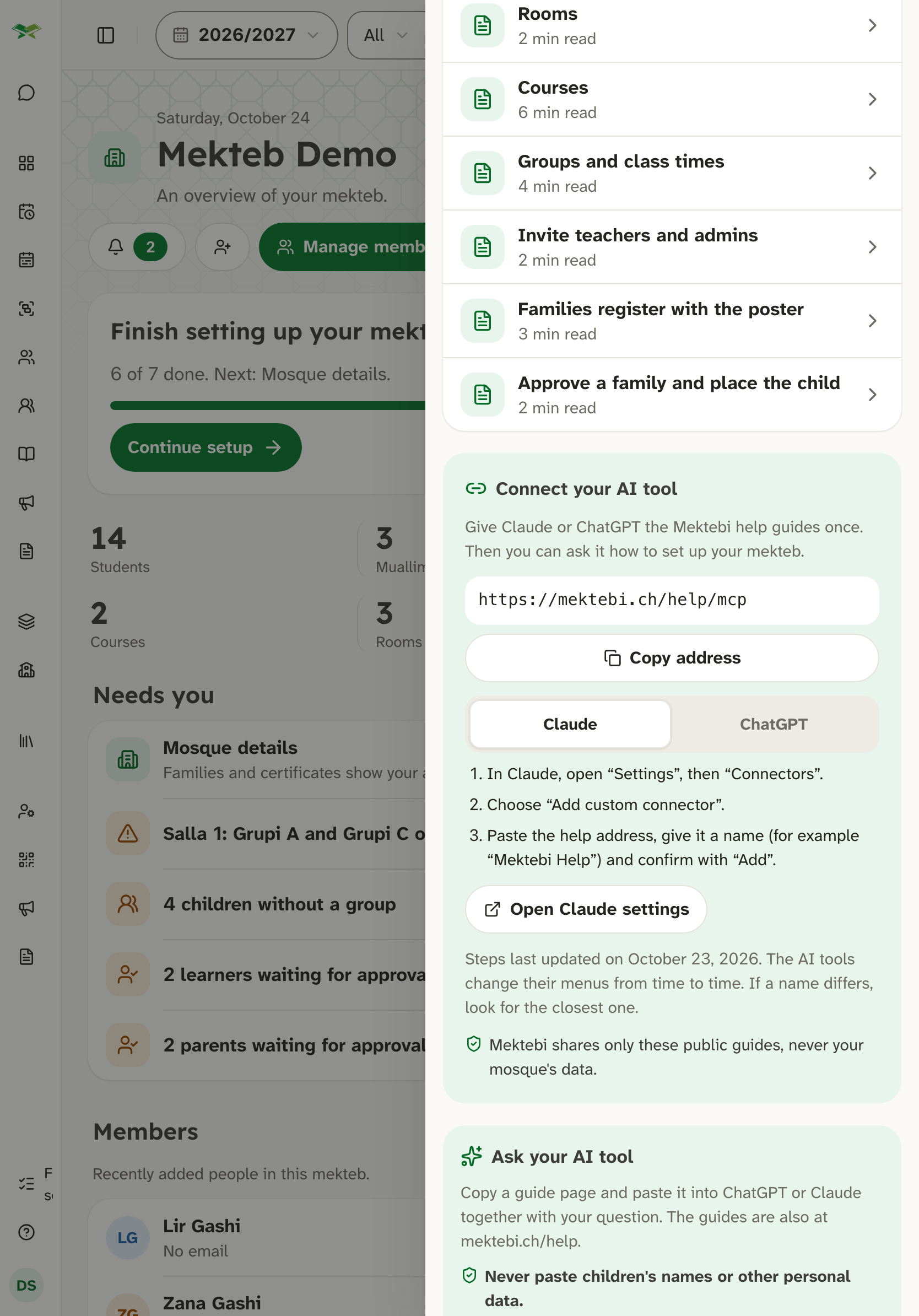
You can also give Claude or ChatGPT all the help guides at once. You connect it one time, and from then on you can simply ask it how something works in Mektebi.
- Open Help in Mektebi and find the card Connect your AI tool.
- Copy the help address:
https://mektebi.ch/help/mcp - In your AI tool's settings, add a new connector, paste the address and give it a name, for example "Mektebi Help". The card shows the exact steps for Claude and for ChatGPT.
The help connector is public and read-only:
- It needs no sign-in and no Mektebi account.
- It shares only the public help guides, the public chapters of this book and the notes on what is new. It never shares your mosque's data.
- It cannot change anything in Mektebi.
In the Mektebi app, copy the address there and add the connector in your web browser.
The Course Assistant for muallims
The Course Assistant helps a muallim or an admin turn their own teaching material, such as a PDF, a Word file or photos of a book, into a draft course in Mektebi. The AI tool asks about the audience, the level and the languages, shows an outline, and creates the draft after you agree: chapters, lessons, assignments and translations.
Turning it on. The Course Assistant is off by default. Each muallim or admin switches it on for themselves, for one mosque, in Settings → AI assistant on the website. The mosque must have accepted the data processing agreement first. When you connect your AI tool, a Mektebi window opens where you sign in, choose your mosque and role, and allow the connection.
What it can work on. Only drafts that were created with the Course Assistant in your mosque, while they are not published and not in use. A draft stops being open to the assistant as soon as it is published, or once learners are enrolled or it has a timetable, grades or certificates. Courses made in Mektebi itself are never open to it. These drafts are shared within your mosque, so a colleague who connects their own AI tool can work on them too.
What it never sees. Mektebi never gives the AI tool data about students, families or other people. It cannot see your mosque's members, enrolments, grades, attendance or chats.
You stay in charge.
- The AI tool cannot publish a course. You check the draft and publish it yourself in Mektebi.
- A course created this way shows the label Created with AI assistant while it is a draft.
- Languages that the AI tool translated can be marked for review. The course page then shows a banner until a muallim clicks Mark as reviewed.
- Exercises with Arabic letters stay hidden from learners until a muallim has checked the Arabic, and a course cannot be published before that. Where the Arabic contains the name of Allah or a word of the Qur'an, only an admin of the mosque, such as the imam, can confirm it. This applies to every course, not only to AI drafts.
- Translations of the meaning of Qur'anic text must be checked by the imam or a muallim before you publish.
A tip for your AI chat. Use a chat in which only the Mektebi connector is switched on, and turn off email, drive, calendar and other connectors there. Text inside a document can try to give your AI tool instructions, and it should not be able to reach your other accounts from that chat.
Disconnecting. You can disconnect your AI tool at any time in Settings → AI assistant, or switch the Course Assistant off to end all connections at once.
Who processes what
When you use an AI tool with Mektebi, the material you give it, and the draft course content it reads back from Mektebi, is processed by the AI provider under your own account and its own terms. The provider is not one of FETOSOFT's sub-processors. Choose your AI tool, and its settings, with that in mind.
Binding texts
The binding texts are the privacy policy, in particular its section on AI assistants you connect, and the data processing agreement. If anything here differs from them, those texts apply.